
GitHub Actions から Azure のリソースにアクセスするには、サービスプリンシパルにクライアントシークレットを作成して利用する必要がありました。
サービスプリンシパルに OIDC (OpenID Connect) のフェデレーション資格情報を登録して、これを GitHub Actions から利用する方法があります。
Entra ID の「アプリの登録」でアプリを作成して必要な情報を取得
prefix=mnrghasp
region=japaneast

az ad app create
  --display-name $prefix

clientid=$(az ad app list
  --display-name $prefix
  --query "[0].appId"
  --output tsv)

subscriptionid=$(az account show
  --query id
  --output tsv)

tenantid=$(az account show
  --query tenantId
  --output tsv)
GitHub にプライベートリポジトリを作成してアプリ情報を登録
gh repo create $prefix --private

gh secret set AZURE_CLIENT_ID --body $clientid --repo mnrst/$prefix
gh secret set AZURE_SUBSCRIPTION_ID --body $subscriptionid --repo mnrst/$prefix
gh secret set AZURE_TENANT_ID --body $tenantid --repo mnrst/$prefix
アプリをサービスプリンシパルとして登録し OIDC 情報を登録
az ad sp create
  --id $(az ad app list
    --display-name $prefix
    --query "[0].id"
    --output tsv)

az ad app federated-credential create
  --id $(az ad app list
    --display-name $prefix
    --query "[0].appId"
    --output tsv)
  --parameters '{
        "name": "Testing",
        "issuer": "https://token.actions.githubusercontent.com",
        "subject": "repo:mnrst/'$prefix':ref:refs/heads/main",
        "description": "Testing",
        "audiences": [
            "api://AzureADTokenExchange"
        ]
    }'
Azure にリソースグループを作成してサービスプリンシパルに閲覧者権限を割り当て
az group create
  --name ${prefix}-rg
  --location $region

az role assignment create
  --role Reader
  --assignee $(az ad app list
    --display-name $prefix
    --query "[0].appId"
    --output tsv)
  --scope $(az group show
    --name ${prefix}-rg
    --query id
    --output tsv)
GitHub Actions のワークフローを作成
mkdir $prefix

cd $prefix

mkdir -p .github/workflows

code .github/workflows/main.yml
name: Run Azure CLI Login with OpenID Connect
on: [push]

permissions:
  id-token: write

jobs:
  test:
    runs-on: ubuntu-latest
    steps:
    - name: Azure CLI Login
      uses: azure/login@v2
      with:
        client-id: ${{ secrets.AZURE_CLIENT_ID }}
        tenant-id: ${{ secrets.AZURE_TENANT_ID }}
        subscription-id: ${{ secrets.AZURE_SUBSCRIPTION_ID }}

    - name: Azure CLI script
      uses: azure/cli@v2
      with:
        azcliversion: latest
        inlineScript: |
          az group list -o table
ローカルリポジトリを作成して GitHub にプッシュ
git init

git add .

git commit -m "first commit"

git branch -m main

git remote add origin https://github.com/mnrst/mnrghasp.git

git push -u origin main
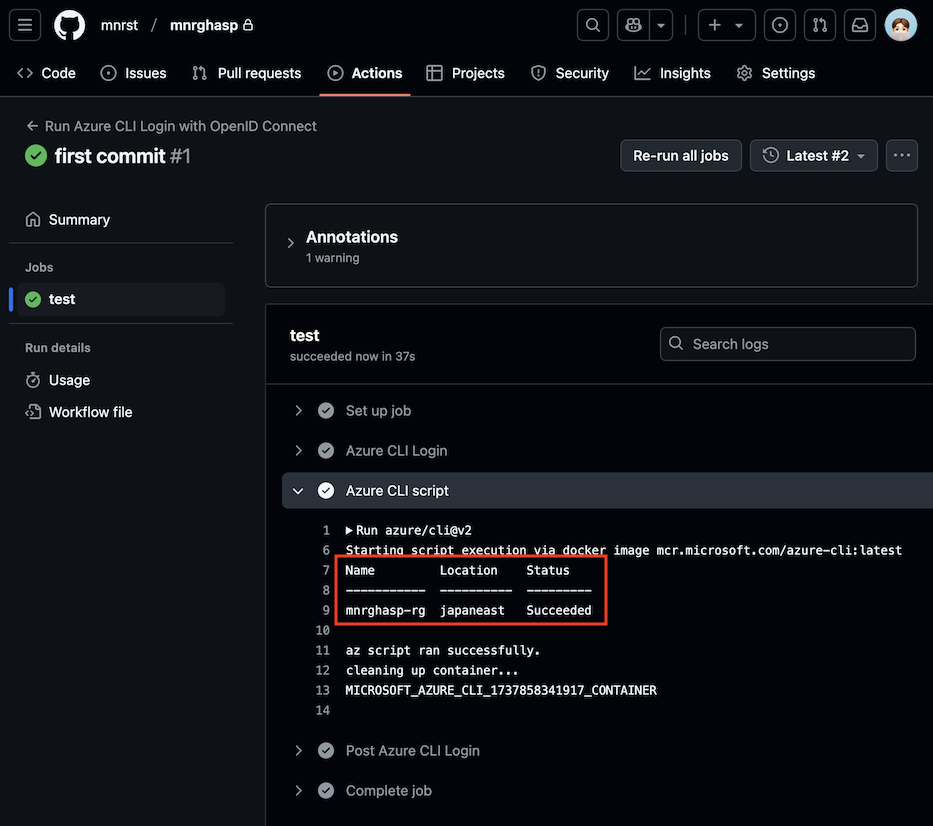
GitHub Actions のワークフロー実行結果
リソースグループ情報を取得できました。
参考
Use the Azure Login action with OpenID Connect
タグ: Azure, GitHub