
今でも環境変数にパスワードを設定してプログラムから利用するの事があるのですが、時代の流れはパスワードレス。
プログラムからパスワードレスで Azure リソースにアクセスできる、マネージド ID が以前からあります。
このマネージド ID を使用して、Azure SQL Dataase への接続をパスワードレスで認証する事ができます。
そこで、Azure App Service の通常盤とコンテナー版でそれぞれ sqlcmd を使用して、インフラ的な動作を確認してみました。
Azure App Sercice 通常盤の検証環境を構築
region=japaneast
prefix=mnrappsql

az group create
  --name ${prefix}-rg
  --location $region

az network vnet create
  --name ${prefix}-vnet
  --resource-group ${prefix}-rg
  --address-prefixes 10.0.0.0/24

az network nsg create
  --resource-group ${prefix}-rg
  --name ${prefix}-nsg

az network vnet subnet create
  --name app-subnet
  --vnet-name ${prefix}-vnet
  --resource-group ${prefix}-rg
  --address-prefixes 10.0.0.0/26
  --network-security-group ${prefix}-nsg

az network vnet subnet create
  --name sql-subnet
  --vnet-name ${prefix}-vnet
  --resource-group ${prefix}-rg
  --address-prefixes 10.0.0.64/26
  --network-security-group ${prefix}-nsg
  --disable-private-endpoint-network-policies true

az appservice plan create
  --name ${prefix}-plan
  --resource-group ${prefix}-rg
  --is-linux
  --sku B1

az webapp create
  --name ${prefix}-app
  --resource-group ${prefix}-rg
  --plan ${prefix}-plan
  --assign-identity
  --runtime "JAVA:17-java17"

az webapp config set
  --name ${prefix}-app
  --resource-group ${prefix}-rg
  --always-on true

az webapp config access-restriction add
  --name ${prefix}-app
  --resource-group ${prefix}-rg
  --priority 100
  --rule-name MyIP
  --action Allow
  --ip-address $(curl -s inet-ip.info)

az webapp vnet-integration add
  --name ${prefix}-app
  --resource-group ${prefix}-rg
  --vnet ${prefix}-vnet
  --subnet app-subnet

# external-admin-sid は自分の Entra ユーザーオブジェクト ID に変更
az sql server create
  --enable-ad-only-auth
  --external-admin-principal-type User
  --external-admin-name myname
  --external-admin-sid 9ae16906-c0ff-4599-9889-d67e4895d086
  --name ${prefix}-sqlsrv
  --resource-group ${prefix}-rg

az sql db create
  --resource-group ${prefix}-rg
  --server ${prefix}-sqlsrv
  --name sqldb
  --service-objective Basic
  --backup-storage-redundancy Local

az sql server firewall-rule create
  --resource-group ${prefix}-rg
  --server ${prefix}-sqlsrv
  --name LocalAccess
  --start-ip-address $(curl -s inet-ip.info)
  --end-ip-address $(curl -s inet-ip.info)

az network private-endpoint create
  --name ${prefix}-pe
  --resource-group ${prefix}-rg
  --vnet-name ${prefix}-vnet
  --subnet sql-subnet
  --private-connection-resource-id $(az sql server show
    --resource-group ${prefix}-rg
    --name ${prefix}-sqlsrv
    --query id
    --output tsv)
  --group-ids sqlServer
  --connection-name ${prefix}-conn

az network private-dns zone create
  --resource-group ${prefix}-rg
  --name privatelink.database.windows.net

az network private-dns link vnet create
  --resource-group ${prefix}-rg
  --zone-name privatelink.database.windows.net
  --name ${prefix}-link
  --virtual-network ${prefix}-vnet
  --registration-enabled false

az network private-endpoint dns-zone-group create
  --resource-group ${prefix}-rg
  --endpoint-name ${prefix}-pe
  --name ${prefix}-zg
  --private-dns-zone privatelink.database.windows.net
  --zone-name sql
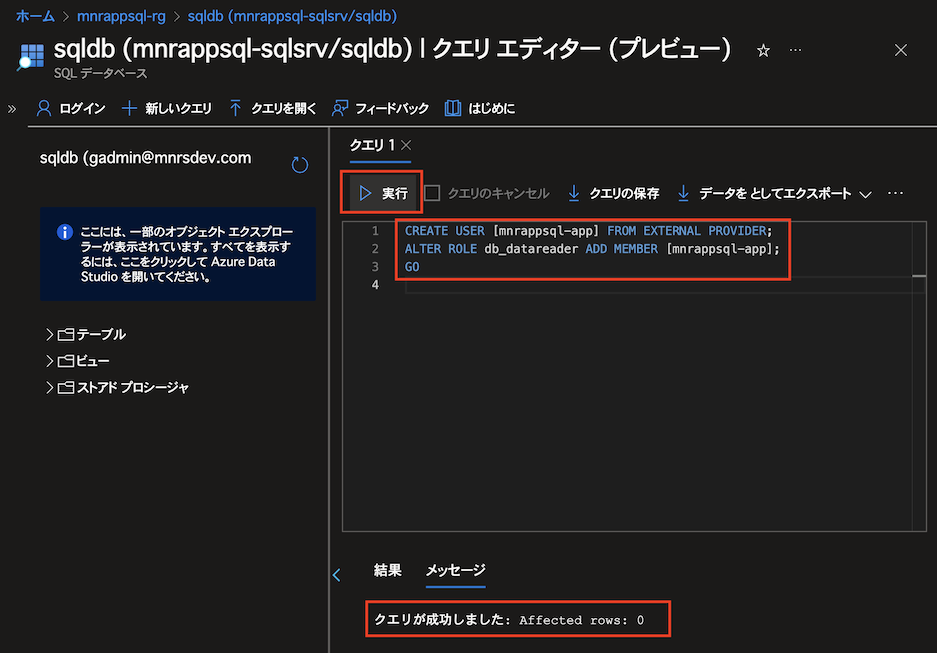
Azure ポータルの SQL Database クエリエディターから App Service のマネージド ID を許可
CREATE USER [mnrappsql-app] FROM EXTERNAL PROVIDER;
ALTER ROLE db_datareader ADD MEMBER [mnrappsql-app];
GO
Azure ポータルの App Service の SSH から動作確認
apt update

apt install -y dnsutils bzip2 curl jq

# 名前解決の確認
nslookup mnrappsql-sqlsrv.database.windows.net

Server:         127.0.0.11
Address:        127.0.0.11#53

Non-authoritative answer:
mnrappsql-sqlsrv.database.windows.net   canonical name = mnrappsql-sqlsrv.privatelink.database.windows.net.
Name:   mnrappsql-sqlsrv.privatelink.database.windows.net
Address: 10.0.0.68

# 環境変数の確認
env | grep IDENTITY

IDENTITY_HEADER=5021c390-f002-439e-9329-4755fd72da45
IDENTITY_ENDPOINT=http://169.254.130.3:8081/msi/token

# Azure Instance Metadata Service の確認
curl -H x-identity-header:$IDENTITY_HEADER
  "$IDENTITY_ENDPOINT?resource=https://database.windows.net&api-version=2019-08-01"
  | jq .

{
  "access_token": "eyJ0e..........................SxYGQ",
  "expires_on": "1739660871",
  "resource": "https://database.windows.net",
  "token_type": "Bearer",
  "client_id": "1449f973-6cff-4d90-b184-ee0648cc2523"
}

# マネージド ID 認証対応版 sqlcmd をダウンロード
wget https://github.com/microsoft/go-sqlcmd/releases/download/v1.8.2/sqlcmd-linux-amd64.tar.bz2

tar xvfj sqlcmd-linux-amd64.tar.bz2

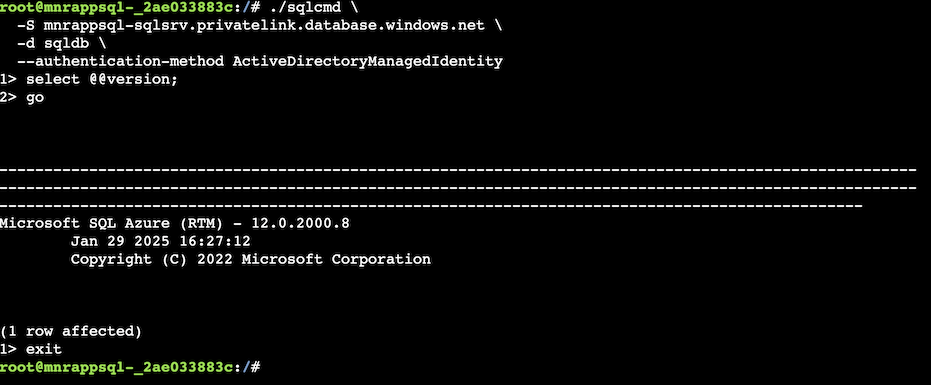
# sqlcmd でマネージド ID 認証を使用して接続
./sqlcmd
  -S mnrappsql-sqlsrv.privatelink.database.windows.net
  -d sqldb
  --authentication-method ActiveDirectoryManagedIdentity

# SQL 実行
select @@version;
go

exit
Azure App Sercice コンテナー版の検証環境を構築
az acr create
  --name ${prefix}acr
  --resource-group ${prefix}-rg
  --sku Basic
  --admin-enabled true

mkdir ${prefix} && cd ${prefix}

cat <<"EOF" > Dockerfile
FROM ubuntu/nginx

RUN date > /var/www/html/index.html

ENV SSH_PASSWD "root:Docker!"
RUN apt-get update
        && apt-get install -y --no-install-recommends dialog
        && apt-get update
  && apt-get install -y --no-install-recommends openssh-server
  && echo "$SSH_PASSWD" | chpasswd
COPY sshd_config /etc/ssh/
COPY init.sh /usr/local/bin/
RUN chmod u+x /usr/local/bin/init.sh

EXPOSE 80 2222
ENTRYPOINT ["init.sh"]
EOF

cat <<"EOF" > sshd_config
Port 2222
ListenAddress 0.0.0.0
LoginGraceTime 180
X11Forwarding yes
Ciphers aes128-cbc,3des-cbc,aes256-cbc,aes128-ctr,aes192-ctr,aes256-ctr
MACs hmac-sha1,hmac-sha1-96
StrictModes yes
SyslogFacility DAEMON
PasswordAuthentication yes
PermitEmptyPasswords no
PermitRootLogin yes
EOF

cat <<"EOF" > init.sh
#!/bin/bash
set -e

eval $(printenv | sed -n "s/^([^=]+)=(.*)$/export 1=2/p" | sed 's/"/\"/g' | sed '/=/s//="/' | sed 's/$/"/' >> /etc/profile)

service ssh start

nginx -g "daemon off;"
EOF

az acr build
  --resource-group ${prefix}-rg
  --registry ${prefix}acr
  --image ${prefix}
  .

az webapp create
  --name ${prefix}-web
  --resource-group ${prefix}-rg
  --plan ${prefix}-plan
  --assign-identity
  --deployment-container-image-name ${prefix}acr.azurecr.io/${prefix}:latest
  --docker-registry-server-user ${prefix}acr
  --docker-registry-server-password $(az acr credential show
    --resource-group ${prefix}-rg
    --name ${prefix}acr
    --query "passwords[0].value"
    --output tsv)

az webapp config set
  --name ${prefix}-web
  --resource-group ${prefix}-rg
  --always-on true

az webapp config access-restriction add
  --name ${prefix}-web
  --resource-group ${prefix}-rg
  --priority 100
  --rule-name MyIP
  --action Allow
  --ip-address $(curl -s inet-ip.info)

az webapp vnet-integration add
  --name ${prefix}-web
  --resource-group ${prefix}-rg
  --vnet ${prefix}-vnet
  --subnet app-subnet
Azure ポータルの SQL Database クエリエディターから追加した App Service のマネージド ID を許可
CREATE USER [mnrappsql-web] FROM EXTERNAL PROVIDER;
ALTER ROLE db_datareader ADD MEMBER [mnrappsql-web];
GO
Azure ポータルの App Service の SSH からコンテナー版の動作確認
apt update

apt install -y dnsutils bzip2 curl jq wget

nslookup mnrappsql-sqlsrv.database.windows.net

Server:         127.0.0.11
Address:        127.0.0.11#53

Non-authoritative answer:
mnrappsql-sqlsrv.database.windows.net   canonical name = mnrappsql-sqlsrv.privatelink.database.windows.net.
Name:   mnrappsql-sqlsrv.privatelink.database.windows.net
Address: 10.0.0.68

env | grep IDENTITY
IDENTITY_HEADER=da89ad08-dbf1-4852-b920-c672389c3b9d
IDENTITY_ENDPOINT=http://169.254.131.5:8081/msi/token

curl -H x-identity-header:$IDENTITY_HEADER
  "$IDENTITY_ENDPOINT?resource=https://database.windows.net&api-version=2019-08-01"
  | jq .

{
  "access_token": "eyJ0e..........................T66mHg",
  "expires_on": "1739661867",
  "resource": "https://database.windows.net",
  "token_type": "Bearer",
  "client_id": "18167057-ac51-4a5b-813b-1b766ec3668d"
}

wget https://github.com/microsoft/go-sqlcmd/releases/download/v1.8.2/sqlcmd-linux-amd64.tar.bz2

tar xvfj sqlcmd-linux-amd64.tar.bz2

./sqlcmd
  -S mnrappsql-sqlsrv.privatelink.database.windows.net
  -d sqldb
  --authentication-method ActiveDirectoryManagedIdentity

select @@version;
go

exit
参考
Azure Web App for Containers で Azure Container Registry と連携したお手軽 CI/CD を試してみた
タグ: Azure